

微软模拟飞行2020开场动画跳过教程
时间:2020-10-28 15:49:46
浏览:次
点击:次
作者:编辑部
来源:游戏王国
立即下载
微软模拟飞行2020开场动画跳过教程
发布时间:2020-10-28 15:21 来源:模拟飞行论坛 作者:yycccc
微软模拟飞行2020开场动画怎么跳过?许多玩家可能都不知道如何跳过游戏的开场动画,下面带来具体的设置教程,供各位玩家们参考。
开场动画跳过教程(各版本)
H版:
右键打开捷径属性(内容) 如图 空一格 输入-FastLaunch 按套用 按确定.

Xbox game pass version版
跳过开场动画的方法:

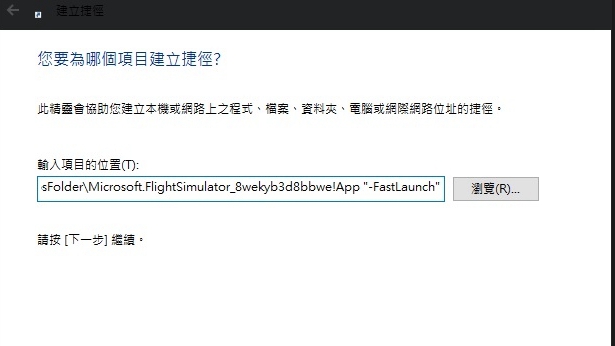

steam版微软模拟飞行2020跳过开场动画的方法:
Right-click on the game title under the Library in Steam and select Properties.
Under the General tab click the Set launch options… button. Enter the following : -FastLaunch
Close the game’s Properties window and launch the game.
右键单击Steam中“库”下的游戏标题,然后选择“属性”。
在常规选项卡下,单击设置启动选项...按钮。 输入以下内容:-FastLaunch 按确定保存
关闭游戏的“属性”窗口,然后启动游戏。
进入《微软模拟飞行2020》专区
查看更多《微软模拟飞行2020》攻略
查看更多《微软模拟飞行2020》攻略
平均评分
0人
- 5星
- 4星
- 3星
- 2星
- 1星
- 暂无评论信息